Cursor + MCP 初體驗
很多時候都是透過痛點(啊雜點)來激勵自己發想工具
今天想試試看,如何 透過 cursor 快速串接azure devops發pr,以前透過FORK才有快速串PR的方法
很想試試看同事口中的自動發PR是怎麼回事
雖然知道技術怎麼做到的,但要怎麼讓AI在我們的開發環境做的完整 到真的沒試過
我很快地在AI Chat 中 描述了我的意圖
1.我要透過AzureDevOps的串接方式(我已知要PAT : Personal Access Token)
2.我要請AI Agent協助我生成相關的PR資訊
3.請自動幫我組成請求發到AzureDevOps的Api去生成PR
但過程我希望有一些規則(例如PR標題/檔案清單/更改目的)
很快的,我取得PAT以後,告訴我的LocalAI,他很快的survey到AzureDevOps的 PR EndPoint
從 local clone下來的Repository,AI其實有辦法知道你對齊的是哪一個remote Repository
接著他生成了一段Python語法,幫我把上面的程序,組裝成了自動化Process
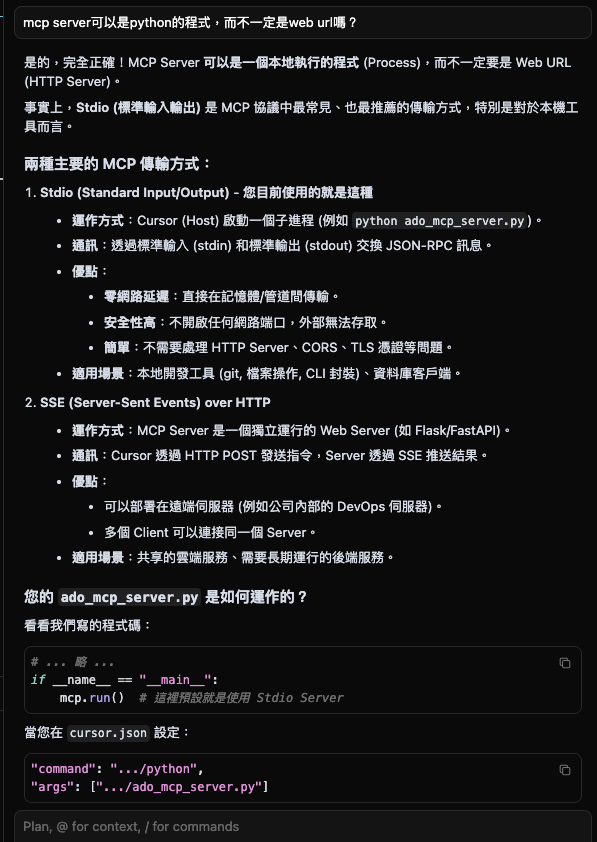
我原本以為這樣就有點MCP的概念了,但後來想想我還沒掛上Cursor的MCP,且run一段程式
是自動化 ,這樣距離 MCP有多遠呢?
詢問了AI以後
他幫我整理成了以下的MCP Server Code,並產生了 MCP Setting
MCP Server
import os
import sys
import json
import base64
import urllib.request
import urllib.error
import subprocess
import ssl
from typing import Optional
from mcp.server.fastmcp import FastMCP

# Initialize FastMCP Server
mcp = FastMCP("AzureDevOps-Agent")

# Constants
ORG = "{OrgName}"
PROJECT = "{TeamProject}"
REPO = "{CodeRepository}"
API_VERSION = "7.1"

def get_pat() -> str:
    """Retrieve ADO PAT from environment or .ado_token file."""
    pat = os.environ.get("ADO_PAT")
    if pat:
        return pat

    # Fallback to local file
    token_path = os.path.join(os.getcwd(), ".ado_token")
    if os.path.exists(token_path):
        try:
            with open(token_path, "r", encoding="utf-8") as f:
                return f.read().strip()
        except Exception:
            pass

    raise ValueError("ADO_PAT not found in environment variables or .ado_token file")

def get_current_branch() -> str:
    """Get the current git branch."""
    try:
        return subprocess.check_output(["git", "rev-parse", "--abbrev-ref", "HEAD"]).decode("utf-8").strip()
    except Exception as e:
        raise RuntimeError(f"Failed to determine current branch: {str(e)}")

@mcp.tool()
def create_pull_request(title: str, description: str, target_branch: str = "main", source_branch: Optional[str] = None) -> str:
    """
    Create a Pull Request in Azure DevOps.

    Args:
        title: The title of the PR.
        description: The full description of the PR (markdown supported).
        target_branch: The branch to merge into (default: main).
        source_branch: The source branch (default: current git branch).
    """
    try:
        pat = get_pat()
        actual_source = source_branch if source_branch else get_current_branch()

        url = f"https://dev.azure.com/{ORG}/{PROJECT}/_apis/git/repositories/{REPO}/pullrequests?api-version={API_VERSION}"

        # Format refs
        src_ref = actual_source if actual_source.startswith("refs/") else f"refs/heads/{actual_source}"
        target_ref = target_branch if target_branch.startswith("refs/") else f"refs/heads/{target_branch}"

        payload = {
            "sourceRefName": src_ref,
            "targetRefName": target_ref,
            "title": title,
            "description": description
        }

        # Auth header
        auth_str = f":{pat}"
        b64_auth = base64.b64encode(auth_str.encode()).decode()

        headers = {
            "Content-Type": "application/json",
            "Authorization": f"Basic {b64_auth}"
        }

        # SSL Context (Bypass for compatibility)
        ctx = ssl.create_default_context()
        ctx.check_hostname = False
        ctx.verify_mode = ssl.CERT_NONE

        req = urllib.request.Request(url, data=json.dumps(payload).encode(), headers=headers, method="POST")

        with urllib.request.urlopen(req, context=ctx) as response:
            response_data = json.loads(response.read().decode())
            pr_url = response_data.get('url', '').replace(
                f'_apis/git/repositories/{REPO}/pullrequests/',
                f'_git/{REPO}/pullrequest/'
            )
            return f"Successfully created PR #{response_data.get('pullRequestId')}: {pr_url}"

    except urllib.error.HTTPError as e:
        error_body = e.read().decode()
        return f"Failed to create PR. HTTP {e.code}: {error_body}"
    except ValueError as e:
        return f"Configuration Error: {str(e)}"
    except Exception as e:
        return f"Unexpected Error: {str(e)}"
D
@mcp.tool()
def get_staged_diff() -> str:
    """
    Get the git diff of staged changes (cached).
    Use this to analyze changes before generating commit messages or PR descriptions.
    """
    try:
        # Run git diff --cached
        diff_output = subprocess.check_output(["git", "diff", "--cached"]).decode("utf-8")
        if not diff_output:
            return "No staged changes found."
        return diff_output
    except Exception as e:
        return f"Error reading git diff: {str(e)}"

if __name__ == "__main__":
    mcp.run()
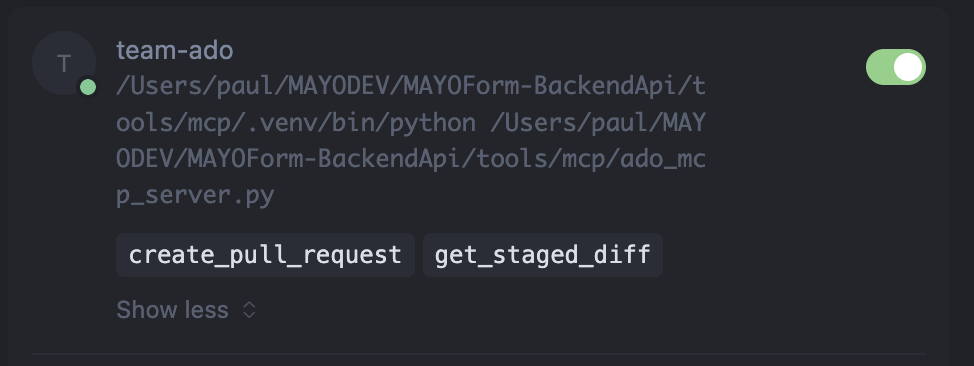
//MCP Setting { "mcpServers": { "{org-team自行代入}-ado": { "command": "tools/mcp/.venv/bin/python", "args": ["tools/mcp/ado_mcp_server.py"] } } } MCP 啟用後的樣子(他可以是local的process,也可以是遠端的server) 透過MCP Setting,是提供AI的Model知道我們有哪些工具庫可以使用
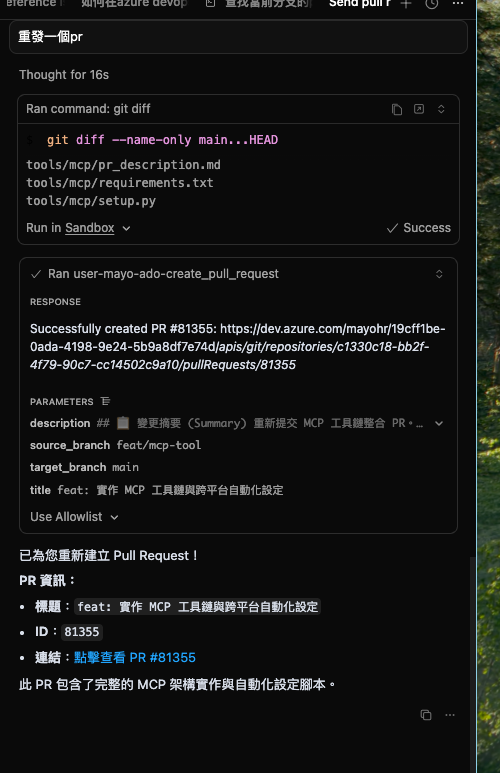
他的PR寫的真漂亮
一開始不清楚 MCP 的具體用途,以為它只是讓企業把自己的資料打包給 AI 後提供服務。後來才發現 MCP 的本質其實是一個協定。
MCP(Model Context Protocol)是一種 protocol,讓 AI model 能透過這個協定與其他 model 或系統進行交互。核心依然是 API,只是這組 API 是「給 AI 用的」,讓 AI 能理解你的產品程式該怎麼操作,進而在理解你的意圖後,做出有目的性的動作,而不是依靠猜測。
換句話說,MCP 不是 API 的替代品,它是 API 的「語義映射層」,MCP 是把「無法讓 AI 理解的 API」→ 轉成「AI 可以語義推理的功能模組」。重點不是 API 本身,而是 AI 能自然語言推理什麼時候、怎樣、以什麼參數呼叫 API。MCP 是行為層,不是資料層。資料只是行為的一部份輸入。
MCP 的想像空間非常大,它本質上是一個能快速替 AI 加上任務能力的「軍火庫」(MCP = LLM 的動作介面(Action Interface)。
對 RD 團隊而言,如果我們用 MCP 讓 AI 能操作 Azure DevOps 發 PR,能大幅簡化開發流程;在 IDE 的 AI 客戶端輸入一句「幫我發 PR」,AI 會讀 MCP 裡的能力、理解你的意圖,並直接使用對應 API,而不是只停留在建議或指示層級,也不再侷限於本機工作區。
再往前一步,當 MCP 整合 JIRA,而 JIRA 的 MCP 內又包含完整的登入與授權 API,使得 AI 在需要權限時能主動走授權流程。這能進一步降低人工干預,讓我們專注於與 AI 溝通意圖,由 LLM 自動把這些意圖轉成 MCP API 的操作序列。
以產品團隊角度來看,你可以將產品/domain 的 API 以 MCP 打包。AI 理解後,就能組合出你需要的 SOP,自動運用你的產品能力。MCP 在本地端能運作後,從團隊、產品到公司層級,都可以逐步規劃對應的 MCP。
例如:
當我們為表單產品建立 MCP,AI 就能透過對話自動發出正確的權限申請單,甚至能直接幫你填單。簽核清單也能在 AI 操作流程中自動取得並串接。你可以用 LLM 來串接任何你想整合的產品服務。
這次體驗後,MCP 的價值不只是在開發 IDE 的便利性,它更是所有生成式 AI Chat 「實務應用化」的核心框架。有心人士或許真的可以善用它來改善跟AI之間的關係與互動。
後記: